Load Newsreader Bold Font
You know you need a lead magnet. Every marketing article says so. Every business coach mentions it. Your competitors probably have three.
But here you are, weeks later, still stuck on what to create.
Not because you're lazy or procrastinating, because the advice out there is either too vague (“just add value!”) or ridiculously overcomplicated (37-page guides explaining how to create a one-page checklist).
Here's the practical version.
A lead magnet is a free resource, like a checklist, template, or guide, that you offer in exchange for an email address to grow your email list. Think checklists, templates, guides, or toolkits that solve one specific problem quickly.
The best lead magnets deliver a quick win, build trust, and make it obvious what problem you help solve next. The goal is to make someone think, “If the free stuff is this good, the paid stuff must be amazing.”
This guide covers what makes a lead magnet work, 10 proven formats to choose from, and a step-by-step process to create yours in under 2 hours. No fluff, just actionable steps.
Real talk: I've built email lists with 70,000+ subscribers using these exact strategies. Not through viral posts—my top reel was about my son's dinosaur obsession, and it did absolutely nothing for my business—but through lead magnets that actually convert.
1. What Makes a Lead Magnet Actually Work?

Before you start creating, you need to understand the three non-negotiables that separate lead magnets people download from lead magnets people ignore.
- It Has to Be Valuable
Valuable means it solves a real problem—it’s more than just “interesting information.”
Ex. of a valuable lead magnet: “5 Email Templates That Get Responses in 24 Hours”
Ex. of a Not valuable: “Everything You Should Know About Email Marketing.”
The first one solves a specific problem (getting ignored). The second one is just… information.
- It Has to Be Specific
Specific means narrowly targeted to one audience facing one problem.
Specific: “How to Design Your First Website in Showit (Without Touching Code)”
Too broad: “Website Design Tips”
The more specific your lead magnet, the higher it converts. Someone who's a SaaS founder will download the first one. They'll scroll past the second one because it's not obviously for them.
- It Delivers a Quick Win
Quick win means someone can consume and apply it without wasting time—but that doesn't mean it has to be short.
People will consume a long ebook if it's hyper-focused on solving the problem they actually need solved. The key is: don't make it longer than it needs to be just because you think more pages = more credibility.
Your lead magnet should only be as long as it takes to solve the problem. No fluff. No filler. Just the solution.
Here's why this matters: People want to try before they buy. Your lead magnet is proof you know your stuff and won't waste their time. That's it. That's the psychology.
Common misconception: Your lead magnet doesn't need to be comprehensive. It needs to be useful. Big difference.
The best lead magnets solve one problem so well that your audience immediately wants to know what else you can do for them.
In short, high-converting lead magnets are specific, useful, and designed for action, not consumption.
2. Why You Need a Lead Magnet
Let's be direct: Your website visitors are leaving right now without a way to stay connected.
According to HubSpot research, 55% of visitors spend fewer than 15 seconds on a website. They're gone before you even have a chance to show them what you offer.
Social media feels easier, just post and hope people see it. But here's the problem: Instagram changes the algorithm, your reach drops. TikTok could get banned, your audience disappears.
I don't love social media. Here's why: You don't own it.
Your email list? That's yours. No algorithm decides who sees your emails. No platform can take it away from you.
The Numbers That Matter
Email marketing delivers $36-42 for every $1 spent, according to Litmus research. That's a 3,600-4,200% ROI.
But here's the practical comparison that matters mor
Without a lead magnet:
- Visitor finds your site through Google or social media
- Visitor likes what they see
- Visitor leaves
- Visitor forgets you exist
- You never hear from them again
With a lead magnet:
- Visitor finds your site
- Visitor downloads your resource
- Visitor joins your email list
- You stay top of mind with valuable emails
- Visitor becomes a customer 6 months later
A one-page checklist I created generated 2,400 subscribers in 6 months. That's 2,400 people I can reach directly—no algorithm required.
Your lead magnet IS how you build an audience. You can't grow an email list without offering something valuable in exchange for that email address.
3. Ten Lead Magnet Formats That Actually Convert
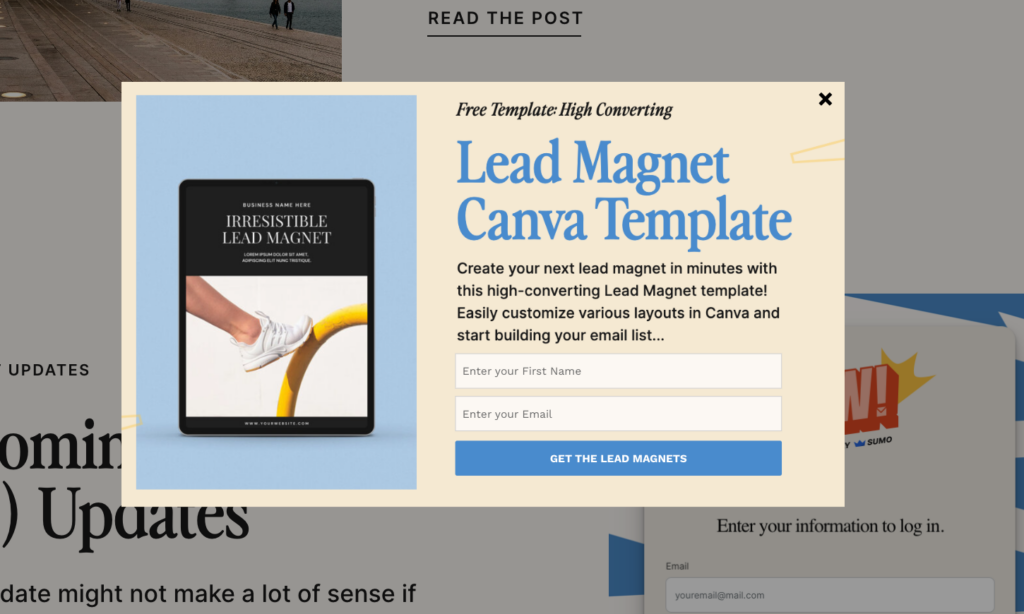
Here's something important before we dive in: Any lead magnet can work as long as it's hyper-relevant to whoever it's meant for.
Ebooks can totally work. Video series can work. Quizzes can work. The format matters less than whether you're actually solving a problem your audience cares about.
That said, some formats are easier to create and tend to convert better than others. Here are 10 formats, ranked from my favorites (easiest to create, highest conversion potential) to ones that work but require more effort.
My Top Picks (Start Here)

1. Checklist
What it is: A simple yes/no task list that walks someone through a process.
Best for: Process-based topics where people need to make sure they don't forget anything (launch checklists, SEO audits, pre-publication reviews).
Example: “The 23-Point Pre-Launch Checklist for Creative Businesses”
Why it works: Easiest format to create. Start here if you're overwhelmed. People love checklists because they're immediately actionable and create a sense of accomplishment. You can create one in under an hour.
2. Template
What it is: Fill-in-the-blank document that does the heavy lifting for someone.
Best for: Repetitive tasks that people need to do regularly (emails, proposals, social media posts, project briefs, client questionnaires).
Example: “5 Client Onboarding Email Templates for Designers”Why it works: Templates save time. Time is money. People will download a good template in a heartbeat because they can use it immediately without starting from scratch. You probably have templates you use in your own business—share one of those!
3. Cheat Sheet
What it is: One-page reference guide that simplifies a complex topic.
Best for: Complex topics with lots of moving parts (keyboard shortcuts, formula references, technical specifications, platform features).
Example: “The Showit Cheat Sheet: 20 Features You Didn't Know Existed”
Why it works: One page. That's it. No one wants to download 47 pages. A well-designed cheat sheet becomes something people bookmark and return to repeatedly.
4. Resource List
What it is: Curated collection of tools, links, books, or services.
Best for: When your audience is drowning in options and needs a trusted shortlist (software recommendations, course lists, service providers, design resources).
Example: “The Ultimate Tool Stack for Creative Business Owners”
Why it works: Curation saves hours of research time. Zero design needed—a well-organized Google Doc works perfectly. Extremely shareable content.
Solid Options (Great for Specific Situations)
5. Swipe File
What it is: Collection of real examples that people can model.
Best for: Copywriting, design, marketing campaigns—anything where seeing examples helps more than reading instructions.
Example: “50 Website Homepage Designs That Convert (With Breakdowns)”
Why it works: Takes time to compile, but extremely valuable. People pay for good swipe files because they dramatically speed up creative work.
6. Case Study
What it is: Deep-dive into a specific success story with the process, challenges, and results.
Best for: Proof-heavy industries like agencies, consultants, B2B services, and high-ticket offers.
Example: “How One Designer Tripled Their Income With Better Popups (Complete Breakdown)”
Why it works: Doubles as social proof. Especially powerful for service providers—one compelling case study showing real results is worth more than a generic guide. If you're selling $5K+ packages, this should probably be your lead magnet.
7. Workbook
What it is: Interactive exercises and prompts that guide someone through a thinking process.
Best for: Strategy, planning, self-reflection, or any topic where the reader needs to figure something out about their specific situation.
Example: “The Brand Positioning Workbook: Find Your Unique Angle in 7 Questions”
Why it works: Higher perceived value than a simple checklist. Takes longer to create, but positions you as a strategic advisor, not just an information source.
Advanced Formats (Higher Effort, Can Pay Off)
8. Mini-Course
What it is: 3-5 email lessons delivered over several days.
Best for: Complex topics that benefit from sequencing, or when you want multiple touchpoints with a subscriber.
Example: “5-Day Email Course: Build Your First Website Without Fear”
Why it works: More touchpoints = more chances to build trust and convert. Each email keeps you top of mind. Requires more planning than a PDF but creates stronger relationships.
9. Video Training
What it is: Screen recording or presentation that walks someone through a process.
Best for: Technical how-tos, software demonstrations, or anything visual that's hard to explain in text.
Example: “How to Design Your First Showit Website (15-Minute Walkthrough)”
Why it works: Higher production effort, but video builds trust faster than text. Seeing you (or your screen) makes it more personal. Great for software tutorials or design walkthroughs.
10. Assessment/Quiz
What it is: Interactive tool that gives personalized results based on answers.
Best for: Diagnosis, categorization, personalization, or qualifying leads.
Example: “What's Your Website Conversion Score? (3-Minute Quiz)”
Why it works: Requires tech setup but generates insane engagement. Pro tip: The best quizzes educate while they assess—slip in stats and insights between questions (like “Did you know websites with clear CTAs convert 3x better?”). You're gathering data AND teaching at the same time.
Remember: The format that works best is the one that matches how your audience prefers to consume information AND solves their most pressing problem. When in doubt, start with a checklist or template—you can always create more sophisticated formats later.
The format matters far less than relevance, speed to value, and a clear connection to what you offer next.
4. How to Create Your First Lead Magnet (The 2-Hour Version)
Here's the process. No fluff. No “just create value.” Actual steps you can follow today.
I'm giving you the fast version because perfectionism kills more lead magnets than bad ideas ever will. Done beats perfect. Every. Single. Time.
Step 1: Identify Your Audience's Biggest Frustration
What keeps your ideal customer up at 3am?
What do they complain about in Facebook groups, subreddit threads, or your DMs?
What questions do you answer repeatedly in your support emails or client calls?
Where to look for problems:
- Your support email archives
- Comments on your blog posts or social media
- Industry Facebook groups or Reddit communities
- Reviews of competitor products
- Your own experience before you solved this problem
Quick decision framework:
If you have multiple ideas, pick the one that:
- You can solve in 15 minutes of their time
- Produces a visible result they can see or use immediately
- Relates directly to what you sell
Example: If you sell popup software (ahem), your lead magnet might be “The 10-Point Popup Checklist for Higher Conversions”—not “Everything About Email Marketing.”
The tighter the connection between your lead magnet and your product, the more qualified your subscribers will be.
Step 2: Pick a Format
Refer back to the 10 formats above. Match the format to the type of solution your audience needs.
Decision shortcuts:
- Process or system? → Checklist, template, or SOP
- Complex topic to simplify? → Cheat sheet or guide
- Need multiple touchpoints? → Mini-course
- High-ticket service? → Case study
- When in doubt? → Checklist or template
You can create other formats later. Just pick one now.
Real talk: The best lead magnet format is the one you'll actually finish. Don't spend three weeks debating checklist vs. workbook.
Step 3: Create a Quick Outline
Brain dump everything that should be included. Don't edit yet—just get it all out.
Organize it into a logical sequence. What order makes the most sense?
Cut anything that isn't essential. Be ruthless. Remember: useful beats comprehensive.
Aim for:
- Checklist: 7-12 clear action items
- Template: 3-5 fill-in-the-blank sections with examples
- Guide: Problem → solution → 3-5 steps → next steps
Time-saving tip: Set a 20-minute timer. Whatever you outline in that time is enough to start. The longer you think about it, the more you'll overthink it.
Step 4: Make It Look Professional (But Not Perfect)
Use Canva's free templates. Use Google Docs (seriously, it works). Use Notion's clean exports.
Spend 30-45 minutes max on design. Not three days. Not three weeks.
Free tools that work:
- Canva – Free templates make you look professional without design skills
- Google Docs/Slides – Free, easy to share, good enough for most lead magnets
- Notion – Creates clean, modern exports with minimal formatting
Design requirements (the only things that matter):
- Clear hierarchy: Your headlines stand out, subheads are obvious
- Plenty of white space: Don't cram everything together
- Professional fonts: Arial, Helvetica, or Canva's suggestions—not Comic Sans
- Your logo or branding: Somewhere visible but not overwhelming
- Consistent formatting: Same font sizes, same spacing throughout
What actually matters: A well-formatted Google Doc with clear structure will convert better than a beautifully designed PDF that's hard to scan.
I've seen ugly Google Docs convert at 35% and gorgeous PDFs convert at 2%. Useful beats pretty.
Step 5: Set Up Delivery
Export your lead magnet as a PDF. It's the most universal format—works on every device, doesn't require special software.
Now you need to decide how you'll deliver it. Here are your best options:
Option 1: Email Delivery (Most Common)
Upload your PDF to your email service provider (Kit, Flodesk, etc.). Set up an automated welcome email that delivers the PDF immediately when someone subscribes. Test it yourself first—subscribe with your own email and make sure the file comes through.
Option 2: Landing Page Download
After someone enters their email, they land on a page with the download link. This is best for tracking conversions and adding a clear “next steps” message. You can build this in Showit or BDOW!.
Option 3: ManyChat for Instagram/Facebook
If you're driving traffic from social media, ManyChat can automatically deliver your lead magnet via DM when someone comments a specific word. Great for social-first strategies.
Pro move: Use a landing page download instead of direct email attachment. You get better tracking, can add social proof, and include a clear next step (like booking a call or checking out your services).
Step 6: Launch and Improve
Ship it. Get feedback. Improve version 2.
Track your conversion rate (subscribers ÷ landing page visitors) and unsubscribe rate.
Ask new subscribers what they thought. Actually reply to their responses—you'll learn more in five conversations than from 100 analytics dashboards.
Version 1 doesn't need to be perfect. It needs to exist.
6. Five Lead Magnet Mistakes That Kill Conversions

Here are the five mistakes that kill lead magnet conversions. I've made most of these—learn from my expensive lessons.
Mistake 1: Too Broad
What it looks like: “The Complete Guide to Marketing”
Why it fails: No one has time for 97 pages of everything. They want one solution to one problem.
The fix: “The 5-Minute SEO Audit Checklist for Local Businesses” instead of “SEO Guide”.
Narrow it down. Be specific about who it's for and what problem it solves.
Mistake 2: Makes Them Work Too Hard
What it looks like: “Outline Your Content Strategy for the Entire Year”
Why it fails: That's a massive undertaking. Most people will download it, feel overwhelmed, and never start.
The fix: “Use This Content Brief to Outline Your Next Piece of Content.”
Give them something they can complete and see results from quickly. One focused win beats an ambitious plan they'll never execute.
Mistake 3: Leads to a Dead End
What it looks like: Your lead magnet solves a problem but doesn't hint at what comes next in their journey.
Why it fails: They got value, but they don't know how to keep working with you. The content doesn't connect to your services or products.
The fix: Build a bridge to the next step. If your lead magnet is “5 Ways to Improve Your Website Design,” mention at the end: “Want help implementing these on your Showit site? Here's how to work with me.” Or reference your service/product naturally within the content where relevant.
Your lead magnet should solve one problem while naturally positioning the next logical step in their journey which ideally involves your paid offer.
Mistake 4: Wrong Format for the Problem
What it looks like: Teaching someone how to build a gaming computer through a PDF ebook instead of a video tutorial.
Why it fails: Some problems are better solved visually. Some need step-by-step text. The content might be great, but if the format doesn't match how people need to learn it, they'll struggle to use it.
The fix: Match your format to the problem:
- Visual/technical processes → Video walkthrough
- Quick reference information → Cheat sheet or checklist
- Thought processes or planning → Workbook or guide
- Repetitive tasks → Templates
If you're teaching Showit design techniques, a video screenshare will work better than a written guide. If you're providing email templates, text works better than video.
Mistake 5: Overthinking It Into Oblivion
What it looks like: Three months of planning, zero shipping
Why it fails: Perfect lead magnets don't convert better than good ones. And a perfect lead magnet that doesn't exist converts at 0%.
Here's the truth: You'll learn more from launching an imperfect lead magnet and getting real feedback than from spending months trying to perfect it in a vacuum. You'll know pretty quickly whether people are interested—usually within the first 50-100 visitors to your landing page.
The fix: Set a 2-hour timer. Create something useful. Ship it. Track the results. If people download it but don't engage, you can improve version 2. If they don't download it at all, you can try a different angle. But you can't learn anything until you launch.
The biggest mistake? Not having one at all. Even a mediocre lead magnet beats no lead magnet. Launch quickly, iterate based on real data.
Most lead magnets fail not because of bad ideas, but because they’re too broad, too heavy, or disconnected from the next step.
7. What Tools Do You Actually Need?

Good news: You probably already have everything you need. Here's the simplified stack:
- Your Website
Showit – If you're building your lead magnet landing page, Showit makes it incredibly easy to create beautiful, high-converting pages without touching code. Drag, drop, and you're done.
- For Capturing Emails
BDOW! – Handles intelligent popups and forms (exit-intent, scroll-triggered, timed). Also includes social proof notifications to show recent signups. Works seamlessly with Showit and all major email providers.
(Yes, I run BDOW!. Yes, this is relevant. Yes, there's a free trial.)
- For Creating Your Lead Magnet
Canva – Free templates make design easy even without design skills. Seriously, their lead magnet templates are solid.
Google Docs – Don't underestimate this. You can create good-looking lead magnets with proper formatting, and it's free. Export as PDF and you're done.
- For Email Delivery
Kit (formerly ConvertKit) – Clean, creator-focused email platform. Easy automation, tagging, and segmentation.
Flodesk – Beautiful email templates if design matters to you. Great for visual brands.
Both handle lead magnet delivery automatically and integrate with most tools.
- Optional But Useful
Loom – For quick video lead magnets. Record your screen, share the link. Simple as that.
That's it. Don't overcomplicate this with 17 different tools. Start with what you have, add tools as you need them.
Your Lead Magnet Questions, Answered

1. How long should my lead magnet be?
As long as it needs to be to solve the problem—no longer, no shorter.
People will consume a longer ebook if it's hyper-focused on solving a problem they really need solved. They'll abandon a short checklist if it's fluffy and doesn't give them what they need.
General guidelines:
- Checklists: 7-15 items
- Templates: 1-3 pages
- Guides: As long as needed (could be 3 pages, could be 20)
- Video: Whatever length delivers the solution
The key: Only include what's necessary. Don't pad it to seem more valuable. Don't cut corners to make it shorter. Just solve the problem efficiently.
2. Do I need design skills to create a lead magnet?
No. Use Canva templates, Google Docs, or even formatted emails.
I've created 50+ lead magnets with zero design skills. A well-organized Google Doc converts better than a beautiful but hard-to-scan PDF. Design helps, but clarity matters more.
Most people overestimate how much design matters. Your audience cares way more about whether you can solve their problem than whether your lead magnet has custom graphics.
3. What if no one downloads it or opts in?
First, figure out where the problem is (Are people visiting your landing page but not opting in?)
Then it's a landing page problem. Check these four things:
- Does your headline match their problem? If you're targeting wedding photographers but your headline says “for creatives,” it's too vague.
- Do you have social proof? Even just “Downloaded by 100+ wedding pros” helps build trust.
- Is your landing page clear and simple? Remove everything except: headline, what's inside, email form, maybe one testimonial. No distractions.
- Are you only asking for email? Don't ask for their phone number, company name, or life story. Just email. Every field you add drops conversion rates.
- Are people not even clicking to your landing page? Then it's a traffic or messaging problem. Your social posts, ads, or wherever you're promoting it aren't compelling enough. Test different hooks and angles.
- For high-ticket services: If you're booking luxury weddings or $10K+ consulting engagements, spending $500 per qualified lead can make sense. One good client justifies higher acquisition costs. Focus on quality over quantity—you don't need 1,000 downloads if you only need 5 perfect-fit clients.
4. Can I use the same lead magnet for different audiences?
Only if the problem is identical for both audiences.
Usually, you'll want to create 2-3 variations that speak directly to each segment.
Example: “The SEO Checklist for SaaS Founders” and “The SEO Checklist for E-commerce Stores” might have 80% the same content. But that 20% specificity—the parts that speak directly to their situation—is what dramatically improves conversion rates.
Generic feels safe but converts poorly. Specific feels risky but converts well
5. How many lead magnets do I need?
Start with one. Seriously.
One good lead magnet beats five mediocre ones. Once it's converting at 15-20%, create variations for different audience segments.
If you don't have one yet, focus on creating one really good one. Don't get distracted by building out an entire lead magnet library before you've proven the first one works.
6. What if my audience is really busy? (Luxury services, C-suite, etc.)
Make it REALLY fast to consume. Busy, high-level people don't want ebooks—they want checklists, templates, or case studies they can review in 3 minutes.
For high-end service providers, your “lead magnet” might actually be getting someone on a call rather than a downloadable PDF.
Alternatives for high-ticket services:
- Personalized audit offer (“Free 10-minute site audit”)
- Quick strategy call (“Free 15-minute consultation”)
- Case study showing specific results for someone like them
- Custom proposal or assessment
The goal isn't just capturing an email—it's starting a conversation with qualified prospects. For a $50,000 consulting engagement, a 30-minute discovery call is a perfectly valid “lead magnet.
Next Steps

Here's what to do right now:
- Pick one format from the list above
- Set a 2-hour timer
- Follow the steps in the “How to Create” section
- Launch it
Your email list won't grow without a lead magnet. Start with one solid offer, test it, and improve from there.
Two hours from now, you could have your first subscribers.
Need help with the popup and landing page?
If you want help turning your lead magnet into subscribers, this is where tools matter.
BDOW! makes it easy to capture emails, target specific visitors (show different offers to new vs. returning visitors), and track conversions in real-time. Free trial available—no credit card required.

Davey Jones
Davey is CEO of BDOW! (a Showit company), the best tool for list building from your website. He's also a cofounder of the brand & website design agency 'Davey & Krista' and digital marketing agency 'Till Agency'.